Creating a professional book cover is one of the most important steps in self publishing. Your cover is the first thing readers see on Amazon. It affects clicks, trust, and ultimately sales. Yet for many authors, cover design feels expensive, confusing, or intimidating.
That is exactly why we built the KDP Cover Creator at KDPFast.
This guide explains what the KDP Cover Creator is, how it works, and how you can use it to design print ready paperback and hardcover covers for Amazon KDP without hiring a designer or learning complex software.
Whether you publish journals, low content books, children’s books, workbooks, or novels, this tool was built to solve the real problems KDP authors face.
Why Book Covers Matter on Amazon KDP
Amazon is a visual marketplace. Readers scroll quickly. A book cover has only a second or two to communicate quality, genre, and professionalism.
A strong cover helps you:
- Increase click through rate
- Build trust with buyers
- Stand out in search results
- Compete with traditionally published books
- Avoid KDP rejection due to incorrect dimensions
A weak cover does the opposite.
Many authors lose sales not because their content is bad, but because their cover looks amateur or does not meet KDP technical requirements.
The Biggest Problems Authors Face With KDP Covers
Before building the KDP Cover Creator, we studied common pain points from real authors.
Incorrect Dimensions
KDP requires exact cover dimensions based on trim size, page count, paper type, and whether the book is paperback or hardcover. A small mistake can cause rejection.
Spine Calculation Confusion
The spine width changes depending on interior type and page count. Calculating this manually is error prone and frustrating.
Bleed and Safe Zones
Text placed too close to trim lines gets cut. Images placed incorrectly look unprofessional. Many authors do not understand bleed rules until it is too late.
Expensive Designers
Professional cover designers can cost hundreds of dollars per book. This is not realistic for many low content, test projects, or new authors.
Complex Design Software
Tools like Photoshop or Illustrator have a steep learning curve and are overkill for many publishing projects.
What Is the KDP Cover Creator
The KDP Cover Creator is a browser based tool that allows you to design print ready Amazon KDP covers without external software.
It handles the technical requirements automatically while giving you full creative control.
The main goals of the tool are simple.
- Remove guesswork
- Prevent KDP rejections
- Save time and money
- Work for beginners and advanced users
Supported Cover Types
Paperback Covers
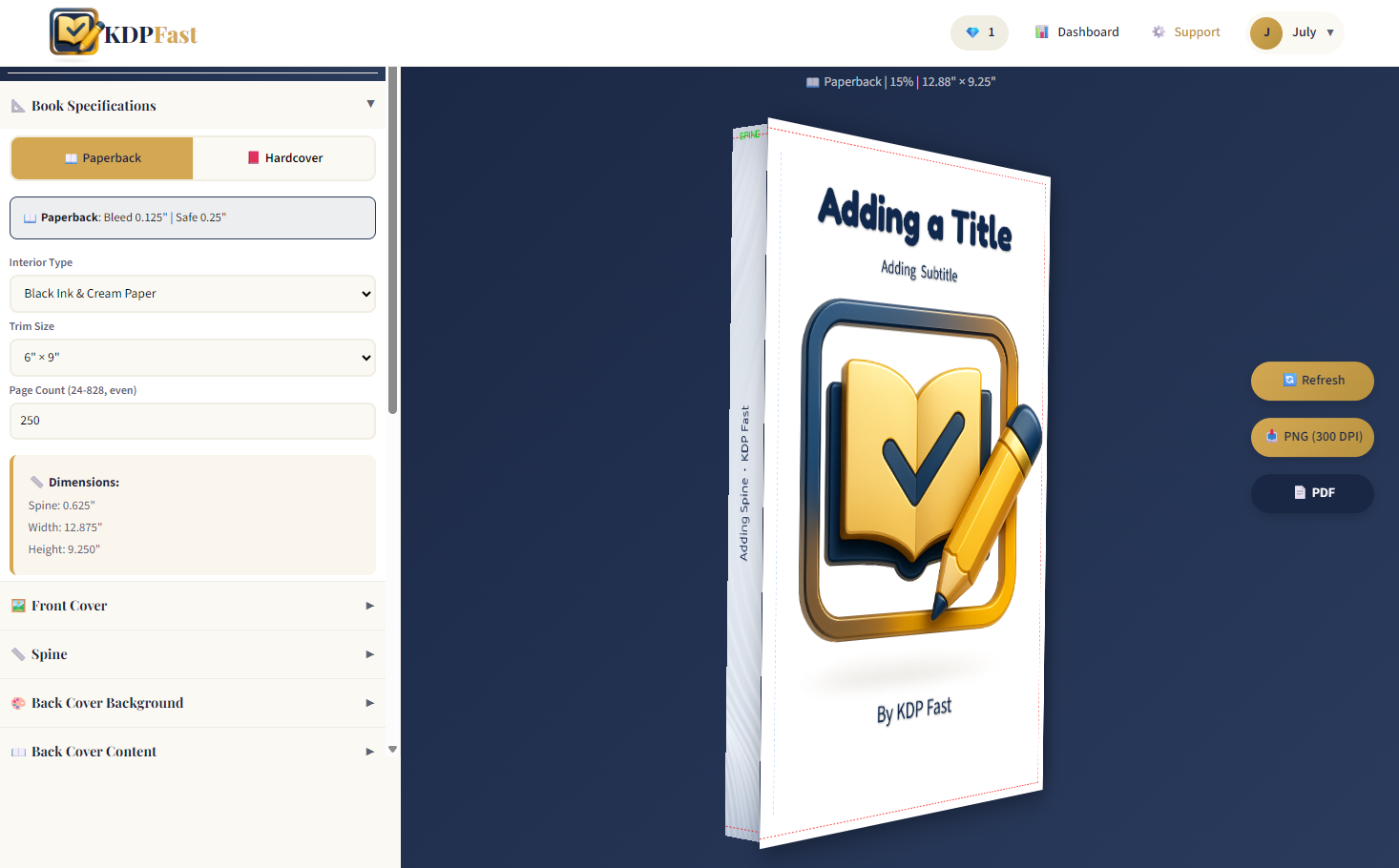
The tool supports paperback covers with automatic bleed calculation, spine width based on page count and paper type, and full wrap layout including back cover, spine, and front cover.
Hardcover Covers
Hardcover books include additional requirements such as hinge and wrap allowance. The KDP Cover Creator handles these rules automatically so your design stays compliant.
You can switch between paperback and hardcover instantly and see the changes live.
Automatic KDP Dimension Calculation
One of the most powerful features of the KDP Cover Creator is automatic dimension calculation.
You simply select:
- Trim size
- Page count
- Interior type
The tool calculates the full cover width, full cover height, spine width, and bleed areas automatically.
This eliminates manual math and prevents costly mistakes.
Front Cover Design Features
The front cover is where your book sells itself.
Upload Images
You can upload your own artwork or illustrations and adjust scale and position using simple controls. Fit modes allow you to choose between cover, contain, or stretch behavior.
Background Options
You can choose solid colors, gradients, or full image backgrounds for your cover.
Text Overlay
The tool allows you to add and customize:
- Book title
- Subtitle
- Author name
- Custom fonts including kid friendly and decorative styles
- Text size, color, shadow, and positioning
Spine Design Made Simple
The spine is often overlooked but is critical for physical books.
The KDP Cover Creator automatically positions spine text based on calculated width. You can customize font, size, color, and background while staying within safe zones.
Back Cover Features
The back cover includes space for descriptions, author bio, website, and contact information.
You can choose:
- Background color or gradient
- Text font and size
- Custom layout positioning
ISBN and Barcode Support
The tool includes ISBN validation and barcode generation.
If you enter an ISBN, the generator creates a correctly sized barcode and allows you to position it on the back cover according to KDP guidelines.
Export Options
When your cover is ready, you can export:
- 300 DPI PNG
- Print ready PDF
These files are fully compatible with Amazon KDP and ready for upload.
Saving and Managing Covers
Registered users can save covers, load previous designs, and continue working later. This makes it easy to iterate, test variations, or manage multiple books.
Guest users can explore and design but must register to save or download.
Who This Tool Is For
- Self published authors
- Low content book creators
- Children’s book authors
- Journal and workbook publishers
- Authors testing new ideas
Book covers should not be a barrier to publishing.
The KDP Cover Creator was built to give authors control, confidence, and compliance without unnecessary cost or complexity.
If you want to design professional, print ready Amazon book covers faster and easier, the KDP Cover Creator was made for you.